The AI Ladder: 5 Levels of AI Use for Activity Businesses
Ask a room of activity providers whether they use AI and most hands go up. Ask what for, and the answers sound alike: a newsletter, a Facebook post, a tricky email to a parent who is upset about a cancelled session.
That is useful, and it is also the first rung of a fairly tall ladder.
The numbers say the same thing from two directions. In Intuit QuickBooks’ 2026 AI Impact Report, a survey of more than 34,000 small and midsize business owners in the US, Canada, the UK and Australia, roughly seven in ten said they use AI regularly, with adoption highest in marketing, admin and customer service. Meanwhile Eurostat’s official count found that in 2025 only 17% of EU businesses with 10 to 49 employees used at least one AI technology in the business.
Both can be true at once, partly because they count different things. Intuit asked owners about any AI use, free chat tools included. Eurostat counts AI technologies used in the business itself, and only in firms with ten or more staff, so many activity providers are smaller still. Put simply: most owners have tried AI for words, and far fewer have let it into the way the business runs.
The AI ladder is a five-level model of AI maturity for small activity businesses: writer, analyst, connected, scheduled and closed loop. Each level hands over a step that a person used to do by hand, and none of them removes the person who decides. There is a one-minute self-check further down so you know which rung you are standing on.
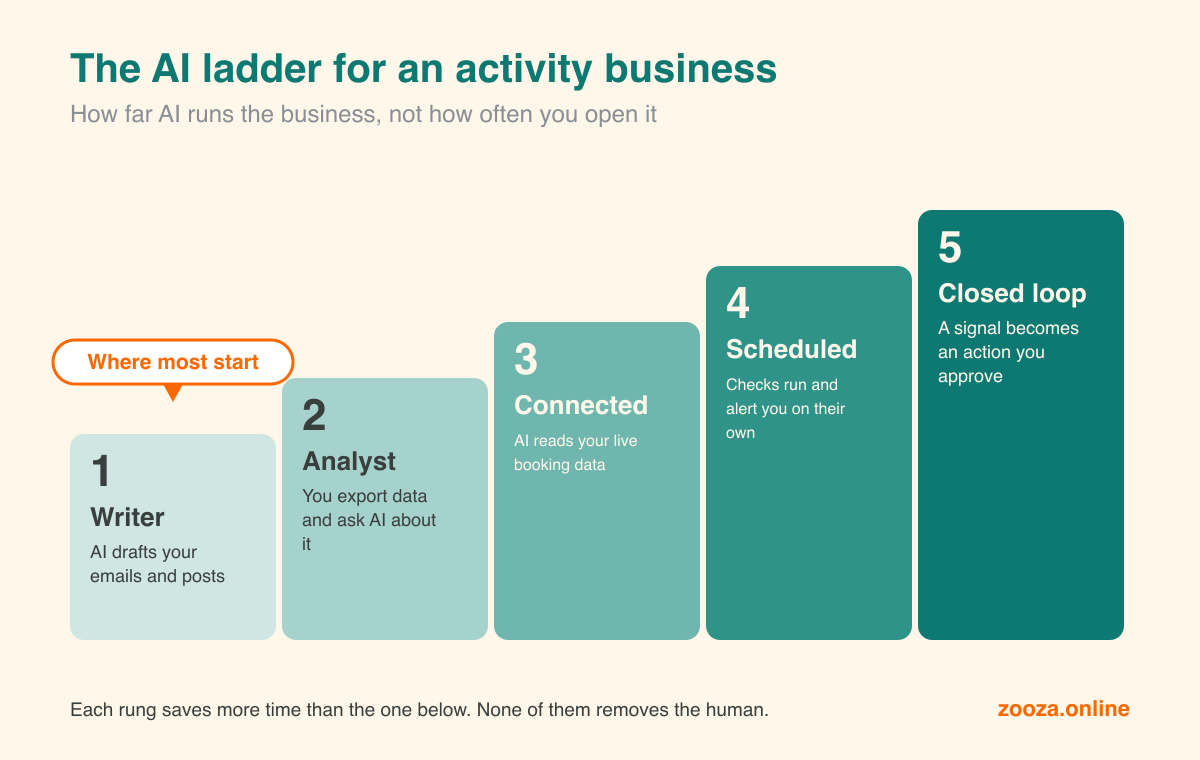
The five rungs, in one line each:
- Writer: AI drafts your emails, posts and newsletters.
- Analyst: you export data and ask AI to analyse it.
- Connected: AI reads your live booking data directly, with no exports.
- Scheduled: checks run on their own and alert you only when a number is out of range.
- Closed loop: a signal in your data becomes a prepared action that a person approves.
The idea underneath is older than chatbots. Human-factors research describes automation as taking over four jobs: gathering information, analysing it, choosing what to do, and doing it. Each can be handed over a little at a time (Parasuraman, Sheridan and Wickens, 2000). This ladder hands over the gathering and the analysing, lets AI suggest the decision on the top rung, and keeps the doing with you.
Rung 1: the writer
AI drafts the words, you fix them and press send. Newsletters, term-start emails, social posts, the reply to a parent you have been putting off. It is where nearly everyone starts, and it genuinely saves time. Our 10 AI tips are mostly about doing this well.
What it does not touch is your numbers. They live where they always did, and you still have to go and look at them. AI at this rung makes you a faster writer. It does not make you a better-informed owner.
Rung 2: the analyst
You export registrations or payments to a spreadsheet, drop the file into a chat, and ask what changed since last term. This is where AI starts to feel like a colleague. It spots the class that lost four children, the venue where trials never convert, the month where payments always slip. We showed what that looks like in custom reports from your own data.
The catch is the export. Every answer starts from a file that was out of date the moment you downloaded it, and every question means another download. People here also tend to paste in more than they meant to, such as full names, phone numbers or notes about a child, because the export had it all. We come back to that in the GDPR section below.
Rung 3: connected
AI reads your live systems directly. You ask “how full is Monday at Riverside?” or “who has not paid for the autumn term?” and the answer comes from today’s data, not last Tuesday’s file.
This is the rung that changes how the job feels, and it is also the easiest one to skip to. A connector is a sign-in, not an IT project. We filmed it once: one photo of a timetable and one prompt became 68 bookable classes across four venues (watch it). Connectors also open the door to asking one question across several tools at once: your bookings, your email platform, your website analytics. We walked through seven connector recipes for exactly that.
The remaining cost is that you still have to remember to ask.
Rung 4: scheduled
The questions you ask every week start asking themselves. Claude and ChatGPT can both run a saved prompt on a schedule, depending on your plan and app, and the useful version is not “send me all the numbers”. It is “tell me only when something is out of range”. We wrote a whole piece on reports that come looking for you.
The best first schedule for most activity businesses is occupancy. A Friday snapshot that lists the classes at or below half full, the ones close to capacity and the children who have missed three sessions in a row is short, actionable and impossible to forget. We explain why that number matters more than the rest in class occupancy: the one number.
Rung 5: the closed loop
A signal in your data turns into a prepared action. The Thursday class at Parkside drops below half full; by Friday morning there is a promotion draft waiting, a message to the families on the waitlist for the full Saturday class, and a suggested local audience for an ad. Your job is to say yes, change a line, or say no.
Some tools can take the final step too and launch an ad through a platform’s API. Our honest advice is to keep a person on every action that reaches families. Something that publishes on its own is a risk to your brand, and marketing that uses children’s data is an area regulators treat as high risk. We wrote about AI that acts and where to keep the brakes.
Very few businesses of any size are here, and nobody has to be. When MIT researchers mapped 721 companies against their enterprise AI maturity model, only 7% had reached the top stage, and the financial gains already showed up in the middle stages, where AI became part of everyday ways of working. Those were large firms, but the lesson travels. In our experience with the businesses we work with, the biggest jump in saved time is from rung 2 to rung 3, because that is where the exports stop.
Where are you?
Tick the statements below that are true today. A rung counts once you tick one of its two statements, and your level is the highest rung you reach without skipping one.
The GDPR question, answered properly
Data protection is a big reason owners stay on rung 1, and it is a fair one. Eurostat asked European enterprises that had considered AI why they did not use it. The most common answer, at 70.9%, was simply lack of relevant expertise. But almost half (48.8%) named concerns about data protection and privacy, and just over half (52.5%) named unclear legal consequences (Eurostat, 2025). If you run children’s activities, you hold data about children, so the worry is not paranoia.
The good news is that a careful setup is not complicated. Five habits cover most of it.
Use a business plan for customer data. On business plans, the major providers do not use your conversations for training by default. OpenAI says this for ChatGPT Business, Enterprise and Edu, and Anthropic says the same for its commercial products. Just as important, a business plan comes with a data processing agreement, which a personal plan does not, however its settings are set. Paying for a personal plan (ChatGPT Plus or Pro, Claude Pro or Max) does not make it a business plan. If you stay on a personal plan for now, switch training off today (in ChatGPT it is “Improve the model for everyone” under Data Controls; in Claude it is the Model Improvement setting), use it only for questions that contain no personal data, and remember that a thumbs-up or thumbs-down can send that conversation for training even with the setting off.
Share the minimum. Most business questions need counts, not people. “How many children in each class?” needs no names. Medical notes, allergies and safeguarding information are special category or highly sensitive data: never paste them into a chat, and do not ask an assistant to look them up. Keep them in your booking system, where access is controlled.
Prefer a connector to a pasted export. This sounds backwards, but on a business plan it is usually the safer option. An export contains everything in the table. A well-built connector answers the question asked, and only within the permissions of the person asking. Zooza AI, for example, signs in through the same login as the Zooza app and inherits that user’s role: an instructor who cannot see payments in Zooza cannot see them through the assistant either. It is still data going to the AI provider, so the plan rule above applies, and a connector can act as well as read.
Keep a person on anything that reaches families. AI can draft every message you send. A human should send it. Zooza AI is built that way: when you ask it to email a class, it works out the audience, drafts the message, and shows you both before anything is sent. That is good data protection and good customer service at the same time.
Treat your AI provider like your email platform. It is a supplier that processes data for you. That means a business plan with a data processing agreement, the provider in your records of processing and your privacy notice, and a note on where the data goes: both major providers are US-based and cover this with standard contractual clauses in their agreements. Because you work with children’s data, a short data protection impact assessment is a sensible step before you connect AI to your live records. The UK regulator’s guidance on AI and data protection is a readable place to start wherever you are in Europe (it is being updated after the UK’s Data (Use and Access) Act). This is practical guidance, not legal advice; if you have a data-protection adviser, show them your setup.
One slip is more common than all of these. It is rarely the owner’s setup. It is an instructor pasting a parent’s email into their own free ChatGPT. Give staff a business seat, or a clear rule: no names and no children’s details in personal accounts. Never share one AI login, because you lose the record of who asked what. Each person should connect with their own Zooza account, so the assistant gets their role and nobody else’s. When someone leaves, remove their seat and their connection the same day you remove their Zooza access.
Where Zooza fits
Zooza does not replace your AI assistant. It is the data underneath it, and the shortest route up the ladder.
Zooza AI connects your Zooza account to Claude or ChatGPT. It is free for active Zooza customers, it takes a sign-in rather than a setup project, and it puts you on rung 3 the same afternoon: classes, registrations, payments, attendance and occupancy, asked in plain language and answered from live data. Networks with several companies can switch between them in one conversation.
From there, rung 4 is a saved prompt on a schedule. The Friday occupancy snapshot is a good first one, and the reports already in Zooza, including the Bookings report and Nick’s Dashboard, give you a baseline to set its thresholds against.
One rung, not five
Nobody needs to finish the ladder this term. The useful move is the single step above where you stand today.
If you write with AI, try asking it a question about last term’s numbers. If you already export, connect instead. If you are connected, schedule the question you ask every Friday. Each of those takes an afternoon, and each one gives you back an hour a week from then on.
Where are you on the ladder?
Tick everything that is true today, not what you plan to do. It takes a minute, and nothing leaves your browser.
A rough self-check, not a score. Most of the value is in the single next step.