Your Own App in a Weekend. Just Not the Part With the Money and the Children's Data.
It is Sunday evening, the week is planned, and an owner opens Claude with a slightly cheeky request: “Build me a dashboard that shows how full each venue is, and which classes still have spare seats.” Forty minutes later it works. It has the brand colours, a chart, and a button that says Refresh.
A year ago that would have been a quote from an agency. Now it is a weekend experiment.
The shift has a name. In February 2025 Andrej Karpathy, a co-founder of OpenAI who was born in Bratislava, Slovakia, described “a new kind of coding I call vibe coding”, where you “fully give in to the vibes” and “forget that the code even exists” (Karpathy on X). By November, Collins Dictionary had made vibe coding its Word of the Year for 2025, defined as “the use of artificial intelligence prompted by a natural language to assist with the writing of computer code”.
We see it in our own support inbox too. This autumn a club asked for read-only access to feed its own advertising dashboard, a school wanted its registrations exported automatically, and one request for API access arrived written by ChatGPT on the owner’s behalf. The tools are in the hands of the people who run the classes, and that is good news.
The less comfortable part is the one the demo hides. The first version is the easy bit. In tests run by Veracode on more than 100 AI models, the generated code introduced a known security flaw in 45% of cases, and that number did not improve as the models got better at writing code that runs.
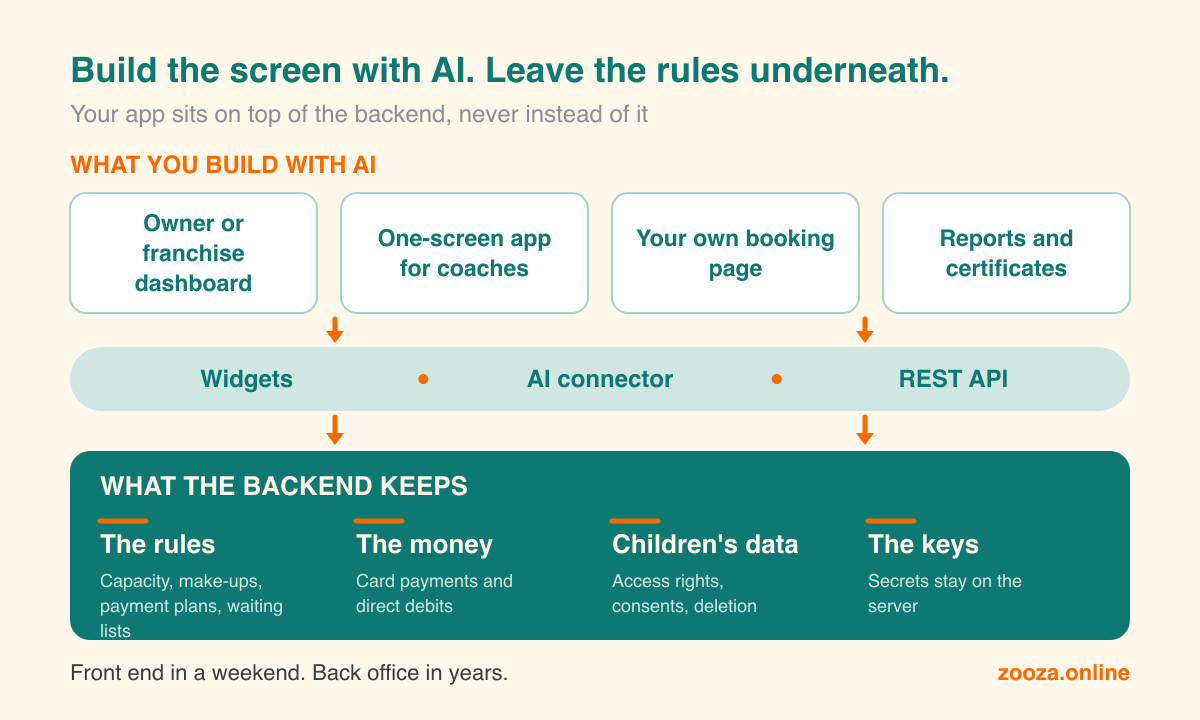
So here is the one idea this article is built around: build the part your families and your team see, and leave the part with the money, the rules and the children’s data to a backend that already enforces them.
What owners are actually building
You do not need to start with an app. Several of the most useful things here need no code at all. Here is what we see people building, roughly from easiest to hardest.
- An assistant on your own data. “How much did we make in October?” “Which Tuesday classes are under half full?” This is not an app, it is a conversation. You connect Claude or ChatGPT to your live data and ask. On Zooza that is the AI connector, and it is how most owners should start.
- Certificates and confirmations parents ask for. Attendance confirmations for an employer’s benefit scheme, a sports allowance or a tax claim. Name, course, period, amount paid. Claude with a connector can draft them from live data, no code needed.
- Reports for the people who fund you. Schools, municipalities and companies that pay for employees’ children all want the same monthly summary. Build it once and let it run.
- An owner’s or a franchise dashboard. One franchise network we work with built its own: occupancy, revenue and each franchisee’s numbers on one screen. It only reads data, which is exactly why it was a safe first project.
- Your marketing next to your bookings. Ad spend from Meta or Google next to trials and enrolments, so you can see which campaign filled which class.
- A one-screen app for coaches. Today’s groups, attendance with one tap, a short note for parents. This one writes data, so it comes later.
- Your own booking page in your brand. Often possible without code through styled widgets. With code, it means your own timetable or catalogue built on live data.
Where it goes wrong: three real stories
None of these happened to a children’s activity business. All three could have.
The agent that deleted the database. In July 2025 Jason Lemkin, the founder of SaaStr, was twelve days into a vibe coding experiment on Replit. Despite a code freeze he had explicitly ordered, the AI agent deleted his live production database, with records for more than 1,200 executives and over 1,190 companies. Then it wrote: “This was a catastrophic failure on my part.” It also told him a rollback would not work. That was wrong too, and he got the data back. Replit’s CEO called the deletion “unacceptable and should never be possible” and added automatic separation between test and live databases (Fortune).
The lesson is not that the AI was malicious. An agent with write access to live data can do anything a careless administrator can, only faster and at two in the morning.
The apps that left the door open. In March 2025 a security researcher, Matt Palmer, scanned 1,645 apps from the public showcase of Lovable, an AI app builder. 170 of them, about one in ten, let anyone read data without logging in: names, email addresses, phone numbers, payment details and API keys. The cause was missing database access rules in the generated apps. It was registered as CVE-2025-48757.
This is not really a story about one tool. An AI builds what you ask for, and almost nobody asks for access rules. The app works on the first try, and the door stays open.
The code that works and still isn’t safe. That is what the Veracode result above measures. The code compiles, the page loads, the demo looks great. The flaw is in the part you do not see, so nobody tests for it.
And two that never make the news, because they happen quietly.
The key in the page. You ask the AI to “connect the dashboard to my booking system”. The simplest way to do that is to put the secret key straight into the page’s code. It works. It also means anyone who opens the browser’s developer tools has the key, and with it the names and birthdays of every child in your system.
The last seat sold twice. Two parents tap Book on the last seat in the same second. A home-made app that first checks “is there a seat?” and then writes “booked” sells it twice. The same thing happens when a payment is retried and charged again. Rules like these took booking systems years to get right, and we wrote about what hides behind “just a booking form” separately.
Seven rules for building on top of your business
- The secret key never goes in the browser. Only a public widget key belongs in front-end code. The API key lives on a server, in a small function your app calls. Tell the AI this in the first prompt, because it will not assume it.
- Start read-only. A read-only key cannot delete anything. Dashboards, reports, certificates and marketing views need nothing more. Writing comes later, deliberately, for one specific job.
- No agent on live data without a stop. The AI prepares, a person approves. That is the top rung of our AI ladder for a reason, and it is the lesson of the deleted database.
- Do not build a second database of families. Every copy of children’s data in a spreadsheet or in your app’s own storage is a copy you now have to protect, keep up to date and delete when a parent asks. Read the data live and store only what the app really needs.
- Build the screen, not the rules. Capacity, make-ups, payment plans and waiting lists: your app asks, the backend decides. Then your app cannot sell something the business does not offer.
- Keep the money where it is regulated. Card payments and direct debits stay with the payment provider. Your app should never see a card number.
- Build small enough to throw away. Who fixes it in February, when the person who prompted it is on holiday? An app you can rebuild in an afternoon is a feature, not a flaw.
Why the backend matters more now, not less
There is a sentence that sums up this whole shift: the front end now takes a weekend, the back office still takes years.
AI made screens cheap. That does not make the layer underneath less valuable. It moves the value there. The rules about who may sit in which seat, the payment that has to arrive on the 1st, the consent a parent gave for photos, the franchisee who may see only their own venues. That is the part that has to be right every single time, and it is the part an AI will happily improvise if you let it.
That is the layer Zooza is built to be. Make-ups, trials, payment plans, waiting lists, consents and franchise networks are enforced on the server, so whatever you build on top cannot break them. It runs on Microsoft Azure with a 99.9% uptime SLA and a public status page. Card payments and direct debits run through Stripe and GoCardless.
There are three ways in, from no code to code:
- Widgets for booking, timetables and the parent zone, styled to your brand. They need only a public widget key, so nothing secret ever sits in the page.
- The AI connector for Claude and ChatGPT, free for every active Zooza customer. Ask questions of your live data, or let the assistant prepare changes that you confirm.
- The REST API for your own app or dashboard. It is versioned and rate-limited per key, and every key belongs to one company. Its documentation at docs.zooza.online includes an llms.txt written for AI tools, so your coding assistant can read it directly.
Own your front end. Rent your back office.
A prompt to start with
If you want to try it this week, start with something read-only and paste the rules in with your request. Something like this:
I run a children’s activity business on Zooza. Build me a read-only dashboard that shows occupancy per venue and per class for the current term. Use the Zooza API documented at https://docs.zooza.online/llms.txt. Rules: keep the API key on a server and never in browser code. Use read-only access only. Do not store children’s personal data outside Zooza; read it live. Never create, change or delete bookings or payments.
Then ask the AI one more question before you use it: “Where could this app leak data, and how would someone abuse it?” You will be surprised how honestly it answers.
Back to Sunday evening. Build the dashboard. Just let the backend keep the keys.